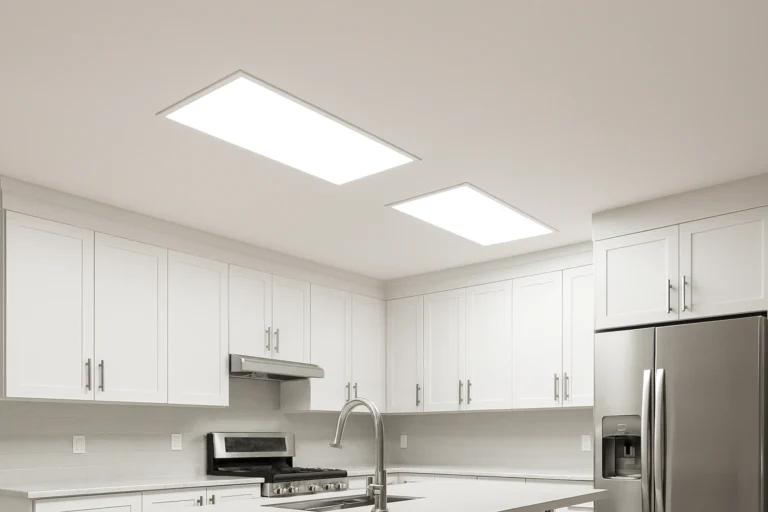
Best WiFi LED Ceiling Panels: 5 That Stay Connected
A Smart Ceiling Light That Drops Off the Network Is Worse Than a Dumb One
WiFi LED ceiling panels are flat, low-profile fixtures that join your home network directly, so brightness, colour temperature and schedules live in an app instead of on a wall switch. When the connection holds, they are the easiest lighting upgrade in the house. When it doesn’t, you are standing in a dark room toggling a switch that no longer does what it used to.
That gap is the whole buying decision, and almost nobody writes about it. Below are five panels I would fit, sorted by the job they actually do — plus the network check that stops half of all smart lighting complaints before you order, and the two situations where a WiFi panel is the wrong fixture entirely.
Top Picks at a Glance
| Panel | Best for | Watch out for |
|---|---|---|
| Nanoleaf Skylight | Modular ceilings and colour scenes | Highest price per square foot of ceiling |
| Good Earth Lighting Smart Flat Panel | Replacing an existing flush mount | App is basic next to the big ecosystems |
| Hykolity Smart 2×2 Flat Panel | Drop-ceiling grids and basements | Needs a 2×2 grid or a surface-mount kit |
| Taloya WiFi Smart Ceiling Light | Bedrooms and hallways on a budget | Thin diffuser shows the LEDs at low angles |
| Philips Hue Enrave | Households already running Hue | Not a direct-to-WiFi device — see below |
The first time I fitted smart ceiling panels, I put four of them in a finished basement and wired them through the existing wall switch — same as any other light. Everything paired, everything worked, and then my partner turned the switch off on her way upstairs. The next morning the app couldn’t find a single one of them, and I spent twenty minutes convinced the whole batch was faulty. It wasn’t. A smart fixture with no power is invisible to the network. Now I either replace the switch with a smart switch that never cuts the load, or I put a small sticker over the toggle before anyone else touches it.
Run This Network Check Before You Order
Nearly every smart ceiling panel on the market joins 2.4 GHz WiFi only. That is not a corner cut — the 2.4 GHz band travels through joists and plasterboard far better than 5 GHz, which is exactly what a fixture buried in a ceiling needs. The problem is that many modern routers publish both bands under one network name and hand your phone the 5 GHz one during setup. The panel then never sees the network it is looking for, and the pairing fails with a message that tells you nothing.
The fix takes five minutes and happens before the fixture arrives:
- Split the bands, or create a guest network on 2.4 GHz. Give it its own name. Pair everything smart to that one.
- Stand where the fixture will go and check signal on your phone. A ceiling cavity, foil-backed insulation and a metal junction box all attenuate the signal. If your phone is at one bar in that spot, the panel will be worse.
- Count your devices. Older routers get unhappy somewhere past 30-odd connected clients. Four ceiling panels, four plugs and a doorbell add up faster than people expect.
If your ceiling sits far from the router and the signal is genuinely weak, a mesh node in that room is a better purchase than a more expensive panel. The panel is not the bottleneck.
Prep matters more than the brand. A mid-priced panel on a clean 2.4 GHz network and a solid mounting surface will outperform a premium fixture fighting a weak signal through foil insulation. Sort the ceiling and the network first, then choose the product. And if the ceiling needs painting, do it before the fixture goes up — our walkthrough of the best way to paint a ceiling is the right order of operations.
The 5 Best WiFi LED Ceiling Panels
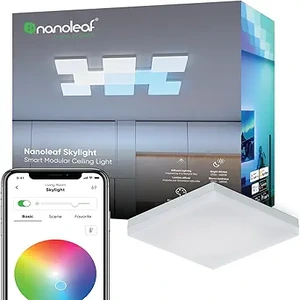 Best for modular ceilings
1. Nanoleaf Skylight Modular Smart Ceiling Panels
A different proposition from every other fixture here. Skylight is a tile system: you mount a base and clip square panels together to cover as much ceiling as you want, in whatever shape the room suggests. Full colour, tunable white, app scenes, and it speaks Matter — which matters more than the brand of your smart speaker, because Matter is the standard designed to stop lighting from being locked to one ecosystem.
One real limitation: price per square foot of ceiling. Covering a whole room takes a lot of tiles, and the cost climbs steeply. This is a feature wall on the ceiling, not general-purpose room lighting on a budget.
Best for: a media room, a home studio, or any ceiling where the light itself is meant to be the design.
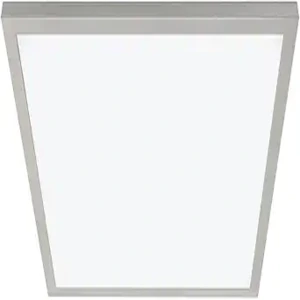 Best straight swap
2. Good Earth Lighting Smart Flat Panel
The one to buy if there is already a flush-mount fixture on the ceiling and you want to replace it in an afternoon. It connects to 2.4 GHz WiFi on its own — no hub, no bridge, no extra box in the cupboard — and gives you dimming and colour temperature from the app or from a voice assistant. Mounts to a standard ceiling box.
One real limitation: the app is functional rather than polished. Scheduling and grouping work; the scene-building and automation depth you get from the larger ecosystems is not there.
Best for: kitchens, hallways and bedrooms where you want smart control without adopting a whole platform.
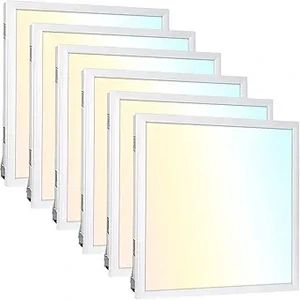 Best for drop ceilings
3. Hykolity Smart 2×2 LED Flat Panel
Built to the 2×2 troffer format, which means it drops straight into a suspended ceiling grid without cutting anything. Smart control on top of a panel that was designed as a workhorse first: broad, even output with no hotspots, and enough brightness for a basement or a garage where the older fluorescent troffer was never quite enough. For a comparison of the non-smart versions of this format, see our 2×2 LED ceiling panel picks.
One real limitation: it wants a grid. On a flat plasterboard ceiling you need a surface-mount frame kit, which adds cost and depth, and the finished look is more office than living room.
Best for: basements, garages, workshops and any room with a suspended ceiling already in place.
 Best on a budget
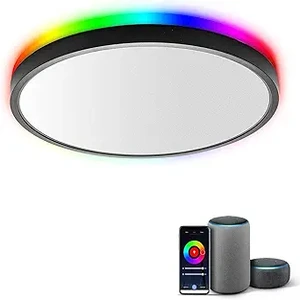
4. Taloya WiFi Smart Ceiling Light
The value option, and it does the two things that matter: it joins 2.4 GHz WiFi directly and it dims smoothly from the app without a dimmer switch on the wall. Slim profile, standard ceiling-box mounting, and cheap enough that fitting three or four rooms at once is a realistic weekend rather than a budget decision.
One real limitation: the diffuser is thin. Stand under it and it is fine; look at it from across the room at a shallow angle and you can pick out individual LEDs through the panel. In a bedroom nobody notices. In a room where the ceiling is in your eyeline from a sofa, you will.
Best for: bedrooms, hallways, landings and utility rooms — fitting several rooms without a large outlay.
 Best if you already run Hue
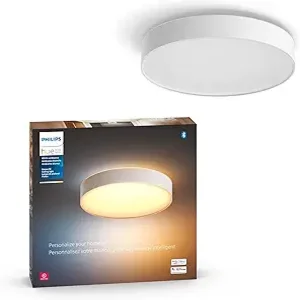
5. Philips Hue Enrave Smart Ceiling Light
The best light quality of the five, and the most reliable day-to-day behaviour — provided you are already inside the Hue system. Even, warm-to-cool tunable output, a diffuser that shows no LED dots at any angle, and an app that has had years of refinement behind it.
One real limitation, and it is the important one on this page: Enrave is not a direct-to-WiFi fixture. It talks Bluetooth out of the box and Zigbee through a Hue Bridge, and the full feature set — remote access, robust automations, large groups — lives on the Bridge. If you were buying specifically to avoid an extra hub, this is not the one. If you already have a Bridge, it is comfortably the best fixture here.
Best for: households already running Hue bulbs who want the ceiling to match.
When a WiFi LED Ceiling Panel Is the Wrong Choice
- Rooms controlled by a switch other people use. Smart fixtures need constant power. If the light is on a switch that guests, kids or cleaners will flip, either fit a smart switch that keeps the load live or choose a conventional dimmable fixture. Fighting this is a losing battle.
- Weak signal at the ceiling. Foil-backed insulation, a metal box or a long run from the router will cause dropouts no fixture can solve. Fix the network first, or use Bluetooth ceiling panels that pair directly to a phone in the room.
- Existing wall dimmers. A smart panel does its own dimming electronically. Leaving it on an old TRIAC wall dimmer causes flicker and buzz, and can shorten the driver’s life. The dimmer comes out and a plain switch goes in.
- Damp locations without a rating. A bathroom over a shower or a covered porch needs a fixture rated for damp or wet locations. Most smart flat panels are dry-rated only, and the rating is stated on the product page for a reason.
What Actually Separates These Panels
Direct WiFi vs hub-based
A direct-to-WiFi panel is simpler: it joins your network, and that is the whole setup. A hub-based system (Hue, and most Zigbee gear) needs a bridge plugged into the router, but the fixtures then talk on their own mesh instead of competing for WiFi airtime. With one or two fixtures, direct WiFi wins on simplicity. Past roughly eight to ten smart lights in a house, a hub is more stable, not less.
Colour temperature range
Tunable white — usually somewhere around 2700K to 6500K — is the feature you will use every single day, far more than colour. Warm light in the evening, neutral or cool for work. If a panel offers colour but fixes the white at one temperature, that is the wrong trade for a room you live in. Our guide to dimmable LED ceiling panels covers the dimming side in more detail.
Brightness for the room
A useful rule for general lighting is roughly 20 lumens per square foot in a living room or bedroom, and closer to 50 in a kitchen or workspace. A 12 × 12 bedroom lands near 2,900 lumens; the same room as an office wants substantially more. Buying one underpowered panel and hoping is the most common mistake here — if the room is for work, our picks for LED ceiling panels for a home office are sized for it.
Efficiency and running cost
LED fixtures draw a fraction of what the halogen or fluorescent lighting they replace did, and the US Department of Energy’s guide to LED lighting lays out the arithmetic. For third-party verified efficiency and lifetime claims rather than marketing copy, check whether a fixture carries an ENERGY STAR certification — plenty of smart panels do not.
Frequently Asked Questions
Do WiFi LED ceiling panels work without internet?
Local control usually survives an internet outage — the panel and your phone are on the same router. What stops working is remote access from outside the house, voice assistants that route through the cloud, and most scheduled automations. Panels that support Matter or a local hub degrade more gracefully.
Why won’t my WiFi ceiling panel connect during setup?
Almost always the 5 GHz band. These fixtures join 2.4 GHz only, and your phone needs to be on 2.4 GHz during pairing. Split the bands or create a 2.4 GHz guest network, pair, then switch your phone back.
Can I use a WiFi LED ceiling panel with a dimmer switch?
No — remove the dimmer and fit a standard switch. The panel dims electronically through the app. A wall dimmer in front of it causes flicker, buzz and premature driver failure.
What happens if someone turns off the wall switch?
The fixture loses power and disappears from the app until the switch goes back on. Most panels return to their last state when power is restored. If this is going to happen regularly, use a smart switch that keeps the load energised.
Do I need a hub for WiFi LED ceiling panels?
Not for direct-to-WiFi panels — that is the point of them. Zigbee-based fixtures such as Philips Hue do need a bridge for full functionality. Past about ten smart lights, a hub tends to be the more stable arrangement anyway.
How bright should a ceiling panel be for a 12×12 room?
Around 2,900 lumens for a living room or bedroom at roughly 20 lumens per square foot, and 5,000 or more if the room is a kitchen or a workspace. Splitting that across two fixtures gives more even light than one bright panel in the middle.
Are WiFi ceiling panels safe to install in a bathroom?
Only if the fixture is rated for damp locations and it is sited outside the zone directly over the shower or bath. Most smart flat panels are dry-rated. Check the rating on the specific model rather than assuming.
What I Would Buy
For most rooms, the Good Earth Lighting smart flat panel: it swaps into an existing ceiling box, joins WiFi on its own, and does not ask you to adopt a platform. For a basement or garage with a grid ceiling, Hykolity. For fitting several rooms cheaply, Taloya. If you already have a Hue Bridge, Enrave is the better light and the extra hub is already paid for. And whichever you choose, split your WiFi bands before the box arrives — that one step prevents most of the frustration people blame on the fixture. If you want the wider comparison, our overview of smart LED ceiling panels covers the non-WiFi options alongside these.
About the author — Sophie Ulman has renovated and painted more rooms than she can count — and made every mistake in the book so you don’t have to. She focuses on real-world durability: not how products perform on day one, but whether the repair holds through a full seasonal cycle.
ThePaintly is reader-supported. We only recommend products we’ve personally evaluated. When you buy through links on this site, we may earn an affiliate commission at no extra cost to you.